ESP
Sea of Thieves ESP Skeleton Explained
"ESP explained" usually means one thing to buyers: can I see enemy pirates through trees, decks, and fog? Skeleton overlays, player boxes, and crew tags are the three layers that answer that question.
Get Access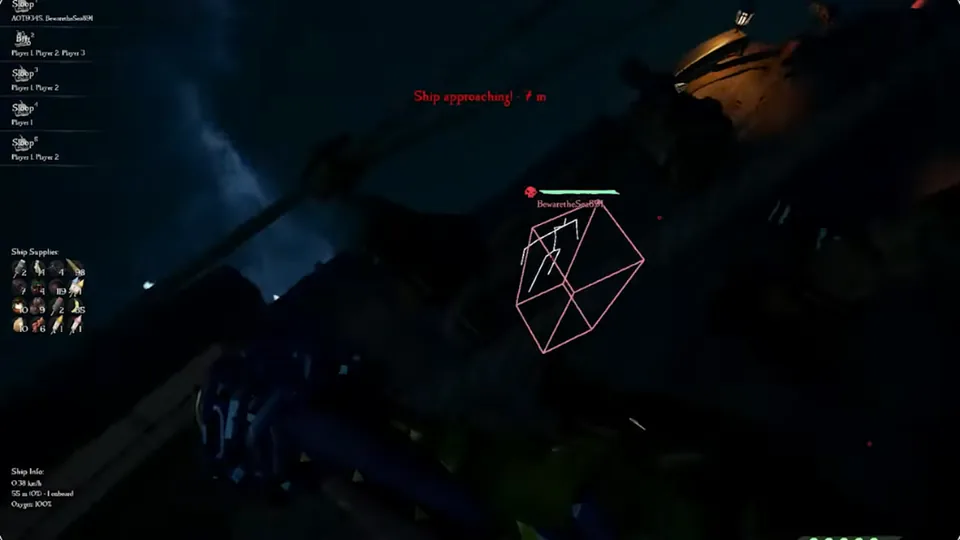
Skeleton ESP vs simple player boxes
Box ESP draws a rectangle around a pirate. Skeleton ESP adds bone lines so you see stance — sword raised, sniper aiming, or revive in progress. Skeletons cost more screen space but win close fights where posture matters.
Distance tags sit beside either style so you know whether to push a duel or save ammo for the merge.
For a broader wallhack primer, read ESP and wallhack explained.
Crew tags and threat coloring
Crew lists group ESP by ship name so a four-stack on a galleon does not look like four random blips. Color hostile crews differently from alliance or passive players when your session allows.
On forts, filter skeleton ESP to human players only — AI skeletons clutter the overlay during PvE phases.
Category breakdown: Sea of Thieves ESP · Compare: Features.
Keep ESP readable during island pushes
Turn off loot and barrel ESP during PvP pushes. You need pirates, not treasure pings. Re-enable loot filters when the island is clear.
Match ESP density to your PC — heavy skeleton draws on weak GPUs cause FPS dips that hurt aim more than the overlay helps.
Get the maintained build on Sea of Thieves Cheats with post-patch notes on Updates.
ESP explained — what to enable first
New buyers should start with player boxes and distance, add skeletons for fort PvP, and leave loot ESP off until the island is clear.
Compare categories on ESP and the primer wallhack explained. Checkout: Pricing.
Official game guides & resources
We link to trusted third-party sources so you can verify patch notes, player stats, and map info outside our site.
- Sea of Thieves on PC Official store page, system requirements, and player reviews.
- Sea of Thieves patch notes & news Read official update posts before you change your loadout.
- Official Sea of Thieves website Game overview from Rare.
- Sea of Thieves Wiki (Fandom) Player stats, maps, and pirate abilities.
- Sea of Thieves community hub Announcements and community discussions.